0-4 s
The bowl and the brush: you paint deep wine-red dye onto your own hair from the parting down, and the strands turn burgundy where the brush passes
It has to read as real at-home dyeing before the reveal means anything
This page is the tool: one photo, one tap, ten seconds of you painting wine-red dye onto your own hair and then showing it off straight and then in big curls. Your face stays yours, your haircut stays yours, and only the colour changes. Nothing gets dyed for real.
Hair Dye Filter AI: Dye Your Hair Burgundy From One Photo
Made with Sendare from the photo on the left. Every video follows the same camera cuts and timing with your photo in the lead role.
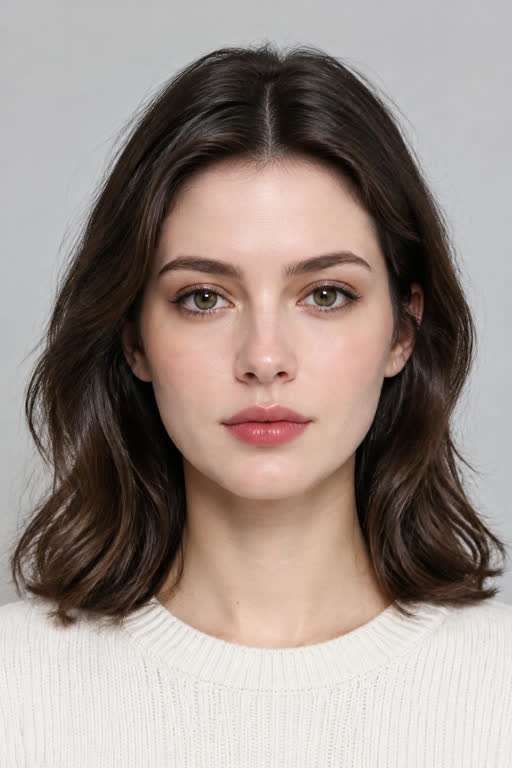
Source photo used for this example
Replaces the lead performer across all 10 seconds (720p MP4 with sound).
Also known as: hair dye filter · hair dye filter AI · AI hair dye filter · hair colour change AI · AI hair color change · burgundy hair filter · red cherry hair trend · hair dye filter CapCut · hair dye filter trend · filtro de tinte de pelo IA · saç boyama filtresi AI
The ten seconds, as you will see them. Every video follows the reference clip's camera cuts and timing, with the person or pet from your photo in the lead role:
0-4 s
It has to read as real at-home dyeing before the reveal means anything
4-5.5 s
The reveal is the whole clip
5.5-7 s
Shows the result is styled rather than only recoloured
7-8.5 s
The second look, the one people save
8.5-10 s
Ends on your face, which is what gets screenshotted
You get a ten-second vertical video. Your own face from your own photo, in your own room if the photo shows one, painting burgundy dye onto your own hair from a bowl with a flat brush; then a cut to the same hair long, straight and glossy under a flat iron; then a second cut to big soft curls and a smile at the lens. It arrives as a 720p MP4 with no watermark and no CapCut link to chase.
You do not get a colour match. This is a visual effect, not a simulation of what a real dye job would do to your hair, which depends on your starting colour, the underlying pigment, the developer and the product. If you are using it to pick a shade before a salon appointment, treat it as a sketch. The trend's own clips are the same: nothing in them was dyed either, which is the joke under the biggest one, where the top comment reads "haters go think say na AI".
The one thing that will make it fail is a photo with no hair in it. A hat, hood, scarf or wrap leaves the model nothing to recolour, and the hair is the entire subject. Everything else — glasses, makeup, the length of your hair, the room behind you — survives the render as it is in your photo.
First-party benchmark: Measured on Sendare (2026-10-24): 10-second 720p 9:16 Seedance 2.5 edit against the trend's own reference clip, so the bowl, the reveal, the flat iron and the curls keep the original timing.
Sound and audio: Your MP4 comes with brush strokes, the flat iron hiss and a light original beat, with no lyrics, so it is safe to post. The trend's own TikTok sound is not a song we can bundle; if you want the exact audio the trend uses, download the clip and attach the official sound inside TikTok, where the sound lives.
Verified sources: First widely shared clip by @bipanabhattarai279 on TikTok (11 Oct 2026, 270,100 plays, read 24 Oct 2026) · Biggest clip of the trend by @harmie_273 on TikTok (14 Oct 2026, 3,300,000 plays, read 24 Oct 2026). Updated October 24, 2026.
Captions: "New hair, who dis? ️" · "Should I actually dye it or keep watching this on repeat" · "Haters go think say na AI"
Hashtags: #hairdyefilter #haircolorchange #burgundyhair #redcherryhair #aitrend
AI video models redraw every frame from your photo. Here is how to fix the most common issues:
There was no hair in the picture to recolour. Use a photo with your hair down and clearly visible.
Warm indoor lighting pushes the red warm. Re-run with a photo taken in daylight; the prompt already rules out bright red, pink and orange by name.
The curl size follows the reference clips the template is built on, not the photo. Re-running produces a new take; the loose cheek-length wave is the intended shape.
Our MP4 carries brush strokes, the flat iron hiss and an original beat, with no lyrics, so it posts without a claim. The trend's own TikTok sound is not ours to bundle — attach it inside TikTok, where the sound lives, if you want that exact audio.
Our one-tap generator runs this prompt automatically with the reference clip. You can also copy it for your own workflow:
Recreate the reference video shot for shot: one continuous vertical phone video in natural daylight where the woman paints dark burgundy dye onto her hair from a round bowl with a flat brush, then the hair is long, straight and glossy burgundy and a flat iron glides down it, and it ends with big bouncy burgundy curls and a proud smile at the lens. Replace the woman in the reference video with the exact person in the reference image in every frame from start to finish, keeping that person's exact face, facial structure, eyes, eyebrows, nose, mouth, skin tone, age and hairstyle from the reference image and the clothes from the reference image. Keep the place, the daylight, the bowl and the brush, the flat iron, the burgundy colour, the cuts and the exact timing unchanged. The dye stays on the hair and in the bowl, never on the face or the hands. Exactly one person, no other hands, no hairdresser. No text, no watermark, no brand names.
Every video on Sendare costs a flat 100 credits — including 10-second 720p Seedance 2.5 recasts with sound. Unused credits stay on your order page and never expire.
Most popular · 1 HD Video ($9.90 / video)
Save 15% · 2 HD Videos ($8.45 / video)
Save 23% · 3 HD Videos ($7.63 / video)
Best Value · 8 HD Videos ($6.23 / video)
No. Each ten-second video is $9.90 for one, with no account and no subscription, and cheaper per video in the 2, 3 and 8 packs. There is no free tier and no watermarked trial: a render costs us multi-dollar GPU time, which is also why we would rather say so than hand out a preview that cannot be posted.
The template is burgundy, because that is the colour the October 2026 trend is built on. If you only want to pick a shade rather than make the video, a still-image colour try-on from the same photo is the cheaper job, and we would rather you spend $9.90 once on the video than on a preview you cannot post.
Yes. Your length, parting and fringe stay as they are in your photo; the colour changes, then the later shots straighten it and then curl it, which is the sequence the trend itself uses.
Our measured runs on this template settle in about four to five minutes on Seedance 2.5 at 720p. You can close the page; the video stays in your order link and we email it to you when it is done.
Each video uses 100 credits. The $9.90 pass makes 1 video, the $16.90 pack makes 2 ($8.45 each), the $22.90 pack makes 3 ($7.63 each) and the $49.90 pack makes 8 ($6.23 each). You can spend them on any template, with any photo, from your order page.
Yes. Your finished 720p MP4 ships with the trend's soundtrack already synced to the moves. Your order page also has a one-tap 'Silent MP4' button if you prefer to download a muted version and attach the official sound inside TikTok, Instagram Reels or YouTube Shorts.
Right after payment you land on your private order page, and we also email your direct order link to the address you entered at checkout. On any phone or computer, you can also click 'Find my orders' in the top bar and enter your email to receive all your video links and remaining credits.
Yes. Failed renders return their 100 credits automatically so you can try another photo right away. If you are unhappy with a result, email support@sendare.co with your order reference within 14 days for a full refund.
One credit balance works across every trend. Pick another template and star in that clip too: